Final Project Deliverables
Solstra Payments is a final project for II3160 Integrated Systems Technology by Muhammad Faiz A (18222063)
Business Goals: Help business accept Borderless Decentralized Payment using Solana Cryptocurrency
Core Unique Capabilities: Solana-based payment creation address as payment gateway and email payment invoice
Main Feature: Payment Gateway
Source Code: https://git.faizath.com/solstra/core API Domain: https://api-staging.solstra.fi
Obtain JWT Bearer Token and API key by login using email login endpoint and Google Oauth login through
https://api-staging.solstra.fi/user/auth/google
API Endpoints
| Method | Endpoint | Usage |
|---|---|---|
| POST | /user/auth/email/send | Login using email, login link will be sent to email |
| POST | /service/pay/create | Create new unique payment adress |
| POST | /service/pay/${paymentID}/check | Verify transaction paid and expired status |
| POST | /service/invoice/create | Create Email Invoice, new unique payment address is sent to email |
| GET | /user/encryptedSecretKeyBackup | Download User Encrypted Secret key Backup |
API Endpoints Details
POST /user/auth/email/send
- Description: Login using email, login link will be sent to email
- Request Body:
{
  "name": "Faiz A",
  "email": "m@faiz.at"
} - Responses:
- 200 (Success):
{
     "status": "success",
     "message": "Email sent. Please check yout inbox",
     "data": {}
} - 400 (Error):
 {
      "status": "error",
      "message": "{error message}",
      "data": {}
 }
- 200 (Success):
POST /service/pay/create
- Description: Create new unique payment adress
- Authorization: X-API-Key
- Request Body:
{
   "currency": "SOL",
   "amount": 0.0001
} - Responses:
- 200 (Success):
{
     "status": "success",
     "message": "New Payment Order Created",
     "data": {
          "id": "67814ad7cb7cd94e48929a8d",
          "currency": "SOL",
          "amount": 0.0001,
          "walletAddress": "5nFwLbKbaNbDMCgFxgmvArZEHZEFY2ucskCzHeD6TKve",
          "checkPaid": "http://api-staging.solstra.fi/service/pay/67814ad7cb7cd94e48929a8d/check",
          "expireAt": "2025-01-10T16:34:11.923Z"
     }
} - 400 (Error):
 {
      "status": "error",
      "message": "{error message}",
      "data": {}
 }
- 200 (Success):
POST /service/pay/${paymentID}/check
- Description: Verify transaction paid and expired status
- Authorization: X-API-Key
- Responses:
- 200 (Success):
{
     "status": "success",
     "message": "Payment Status: Paid",
     "data": {
          "id": "677eba192141a7f1f0765ba7",
          "currency": "SOL",
          "amount": 0.0265625,
          "walletAddress": "AEaAarW5kyVfj8qn4FZxJkfTajS9xofKztNsB48vUH5C",
          "checkPaid": "http://api-staging.solstra.fi/service/pay/677eba192141a7f1f0765ba7/check",
          "isPaid": true,
          "isExpired": false
     }
} - 400 (Error):
 {
      "status": "error",
      "message": "{error message}",
      "data": {}
 }
- 200 (Success):
POST /service/invoice/create
- Description: Create Email Invoice, new unique payment address is sent to email
- Authorization: X-API-Key
- Request Body:
{
  "currency": "SOL",
  "amount": 0.0001,
  "email": "m@faiz.at"
} - Responses:
- 200 (Success):
{
     "status": "success",
     "message": "New Payment Order Created and Sent to Email",
     "data": {
          "id": "67814c17cb7cd94e48929bbf",
          "currency": "SOL",
          "amount": 0.0001,
          "walletAddress": "G6RDf6DiXNhPdjkd3ismFxBRvjG58goMeyCd5utJseie",
          "checkPaid": "http://api-staging.solstra.fi/service/pay/67814c17cb7cd94e48929bbf/check",
          "expireAt": "2025-01-10T16:39:31.613Z"
     }
} - 400 (Error):
 {
      "status": "error",
      "message": "{error message}",
      "data": {}
 }
- 200 (Success):
GET /user/encryptedSecretKeyBackup
- Description: Download User Encrypted Secret key Backup
- Authorization: Bearer Token
- Responses:
- 200 (Success):
{
     "status": "success",
     "message": "Downloading Encrypted Secret Key Backup Successful",
     "data": {
          "encryptedSecretKeyBackup": "{\"key_id\":\"r8q6LggYiMV0XFxuro-ZRA\",\"cipher_text\":\"VTLipGKQqC6/9Dpe2WpmSiGIcRM5biLce83pilp9ZA8VAClWYDtq28dOs6oWxGFDlDGqsjcJ/c6Zp9Un1rdiA8tWsfkL1TcsDVEHGk656dT0FoUx5u2RIxjId9HriQ+rmFwsTF0XZNEDKmiCehQjD8iR3iXo2GlRiWw5qVcqOh50Rp2iCytm6Di9+sBIbLeyzgeqCAS4l9QVLItacrPGiNaye5oqm1siBqbMSCUo52NTbvzh2cG9qLaW92vnRLIXLvZa5R/U+jp5oGuGUEBD9ZzTGPuepi7nk4i6+Nr+/p9aNAvGQZnvas+JofH7aOF3dtVWI/Dpu9jmF3J3LDAFCMTbQkqj9jRT3dk+uv7xQ/LRCjlSqvOVF69FBhsO81jc5bih7tmPrZLObbPTtgnhvkeZJafLVuSdrvStkFpxhN5HaRJwjUWTgq90AV2s2Il70uZwRHt1hSWJGPVw6EK85da/uN+I4RtpLf82mEyCuoZHs+ZuDqvkvMEv+CKqKVXXz3W1LLMGW2k73CKovXsDT0LTSav4brVL4YwTFtOTvzZw31m1iAXmtYNIKN5FcTpunYt5Atgncw4ikxhFJ+FYyjzzT3J2yEV5Yaes4qxJU5a67Vzu5az3HPGMdHdcGHu+bHZuR3o7z2I8ZaxtqhuEthSxJk4oRUOpnGJsjVWrkjnOD/dVlm/M1MzTyfXukoe3fuquF0e1qYtSIEFx+rwbFcbTedkK78X9ccINrslUB4xP5bJouvqZdIlHHV+cMoooJLI=\",\"iv\":\"CtbOTBRobnASHX2RBf5S+A==\"}"
     }
} - 400 (Error):
 {
      "status": "error",
      "message": "{error message}",
      "data": {}
 }
- 200 (Success):
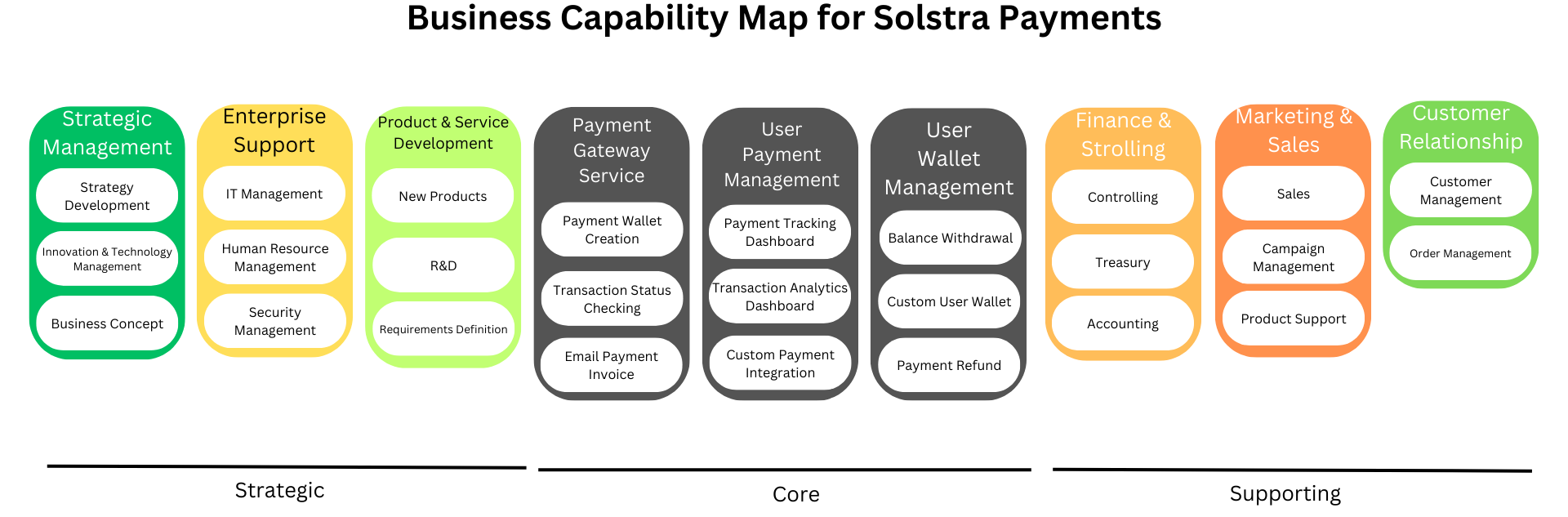
Business Capability Map
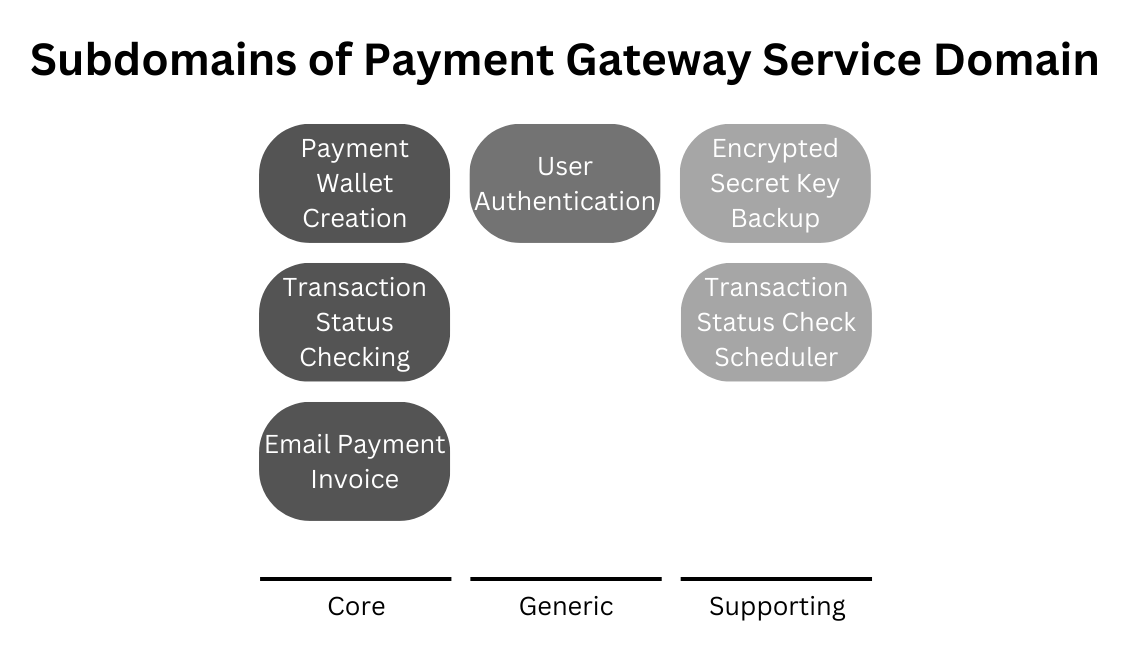
Subdomain
-
Payment Wallet Creation Create Solana payment address on the fly by generating keypair locally.
-
Transaction Status Checking Check transaction status by connecting to blockchain and evaluate if Solana wallet balance are greater than or equal to the required transaction amount created previously.
-
Email Payment Invoice Create Solana payment address and send the transaction address to customer email address.
-
User Authentication Authenticate user API request using JWT Bearer token for User-related API and API Key for PAyment-related API
-
Encrypted Secret Key Backup Encrypted Secret Key is backed-up using third-party service “Furina Encryption Service”. The backup is encrypted so the third-party service cant read the plaintext state of the content. User also can download the Encrypted Secret Key Backup through the API.
-
Transaction Status Check Scheduler Pending transaction is stored in cached and periodically checked using scheduler. Every transaction is checked whether the transaction is paid or expired and if one condition met is removed from cache.
Software Architecture
Backend





-
Javascript
As the backend server that serve core API is using Nodejs runtime environment and Express.js web framework, Javascipt is the main language used in this project.
-
Nodejs
Nodejs is the javascript runtime environment that execute javascript code in the backend server. Nodejs is chosen because Nodejs is the most well-known javascript runtime and has a lot of dependencies available to use.
-
Express.js
Express.js is the web framework that handle http request in the backend. Express.js is a part of MERN Stack (MongoDB, Express.js, React and Nodejs) so it's a powerful nodejs web framework and optimized for MERN Stack.
-
MongoDB
MongoDB is the non-relational database used to store services data. MongoDB is a part of MERN Stack (MongoDB, Express.js, React and Nodejs) so it's a powerful non-relational database and optimized for MERN Stack.
-
Redis
Redis is a key-value Cache used to store pending transaction and rate-limit. Redis is chosen as it's simple yet powerful key-value cache.
Payment Gateway Functionality
Create payment address
const web3 = require("@solana/web3.js");
let userKeypair = web3.Keypair.generate();
let walletAddress = userKeypair.publicKey.toString();
Check if payment address is paid
https://git.faizath.com/solstra/core/src/branch/staging/app/utils/web3/checkPaid.js
const web3 = require('@solana/web3.js');
const connection = new web3.Connection(RPC_URL, 'confirmed');
const balance = await connection.getBalance(publicKey);
const formattedBalance = balance / (10 ** 9);
if (formattedBalance > required_balance_to_pay) {
     // Payment address is paid
} else {
     // Payment address is still unpaid
}
Authentication
Payment-related API
Payment-related API is authorized using API Key
https://git.faizath.com/solstra/core/src/branch/staging/app/middlewares/auth/api-key/api.verify.js
const api_key = req.header("x-api-key");
if (!api_key) {
     return res.status(401).json({
          status: "error",
          message: "Unauthorized: X-Api-Key Header required",
          data: {}
     });
}
const paymentProfile = await Payment.findOne({ apiKey: api_key });
if (!paymentProfile) {
     return res.status(401).json({
          status: 'error',
          message: 'Unauthorized: Invalid Authentication',
          data: {}
     });
}
req.paymentProfile = paymentProfile;
next();
User-related API
User-related API is authorized using JWT Bearer token
https://git.faizath.com/solstra/core/src/branch/staging/app/middlewares/auth/jwt/jwt.verify.js
const jwt = require("jsonwebtoken");
jwt.verify(token, process.env.JWT_SECRET, (err, decoded) => {
      if (err) {
          return res.status(401).json({
               status: "error",
               message: "Unauthorized: Invalid Authentication",
               data: {}
          });
      }
      req.user = decoded;
      next();
  });
Hosting




Backend Server is hosted on VPS running Ubuntu (GNU/Linux). Backend Server is built to Docker container image and served using Nginx reverse proxy. Docker container is managed using Caprover.
Implementation
-
Git repository is initialized in developer's local machine and Caprover app created with CI/CD enabled using Gitea webhook to Caprover
-
Npm is initialized in developer's local machine. Dependencies (Tech stacks) is installed using Npm. MongoDB database schema is created.
-
Backend server is developed using VSCodium IDE by creating Express.js Router and Controller. First handling user creation, then payment address creation, and transaction status checker.
-
Third-party service is integrated by adding required database schema and API endpoint.
-
Git repository is pushed to remote, sending webhook to Caprover, then the Caprover will do git pull to the repository. The Caprover then build and run the Docker image from the Dockerfile.
Features
- Create Payment Address (Solana)
- Automatic Transaction Status Checking
- Email Payment Invoice (New Payment Address sent directly to customers)
Integration
This service used the third-party service, Furina Encryption Service (https://furina-encryption-service.codebloop.my.id/docs) provided by Wisyendra Lunarmalam (18222095) to encrypt and backup User Encrypted Wallet Secret Key. The backup is encrypted so the third-party service cant read the plaintext state of the content. User also can download the Encrypted Secret Key Backup through the API.
Source Code Directory Structure
app
├── configs
│   ├── cache
│   │   └── redis             // Redis cache config
│   └── database
│          └── mongodb        // MongoDB config
├── domains                   // Domains directory, using Domain Driven Design Architecture
│   ├── services
│   │   ├── invoice           // Invoice generator
│   │   └── payment           // Payment generator
│   └── users
│       ├── actions
│       │   └── auth
│       │       ├── email
│       │       └── google
│       └── entities
├── middlewares
│   └── auth
│       ├── api-key
│       ├── jwt
│       └── passport
├── routes
├── templates
│   ├── email
│   └── pages
└── utils
    ├── auth
    │   └── jwt
    ├── mail
    ├── scheduler
    └── web3